Sources
Several programs connected at once, and how to pick the one that draws.
A source is a program that draws on the deck: Companion, the Elgato app or your own server. Up to 4 servers and 4 Network Dock sources connect at once, in any mix.
One source is active. It draws and gets the input. The others stay connected. Companion and the Elgato app keep drawing into their own picture in the background, so a switch shows it at once. A server draws again after the switch.
Switching
Home screen, Companion away
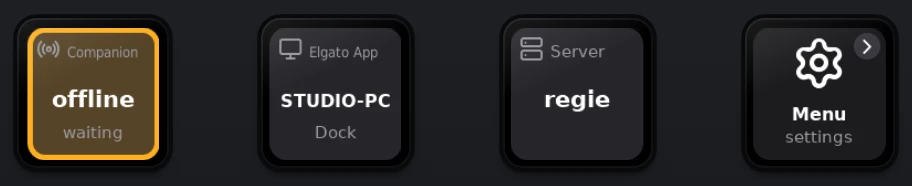
First tap on the Elgato app
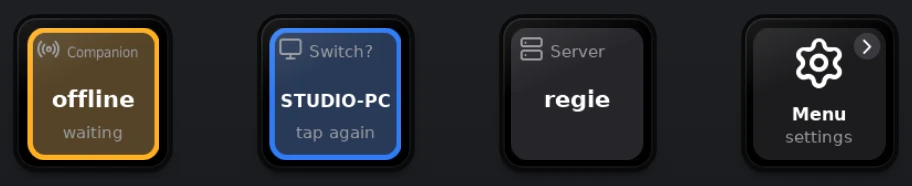
Second tap within 3 s
The Elgato app draws
- On the deck. On the home screen, tap a source, then tap again within 3 s while it says Switch?.
- In the web UI. Pick a row under Active source on the overview (demo).
- Over the API. Set
controllerandhost, see below.
When no source draws, the deck shows its home screen and says what is missing, for example Waiting for Companion.
When a source goes away
- The first connected source of the same program draws. For Companion, Satellite comes first.
- Servers take over in list order. At once when the connection closes, within 6 s when the server goes silent.
- With no source of that program, the deck shows its home screen.
Over the API
Two settings pick the source. controller is the program, host names the entry from sources in the status.
controller | Program | host |
|---|---|---|
companion | Companion, Satellite or dock | satellite, or the computer's IP |
app | The Elgato app | The computer's IP |
server | Your own servers | The server URL |
An empty host means the first connected source of that program. The change works at once.
curl -u admin:PASSWORD -H 'X-DeckConnector: 1' -X PUT \
  -d '{"controller": "companion", "host": "satellite"}' http://192.168.1.50/api/config